DIY Observable Cloud Infrastructure
This is a high-level overview of my efforts to build low-cost, portable cloud infrastructure with observability, load balancing, and autoscaling included from the start.
The infrastructure and tooling for a modern webapp often has many many moving parts. But what if someone wanted to launch a small, unproven webapp, with some of those modern features, for less than $60 a month, and without locking them in to a particular cloud platform?
Sure, they could start with a single server, but that’s a single point of failure, so let’s strive for something in between.
Desired features
- Automatic SSL certs
- Load balancing
- Centralized logging and metrics for hosts and applications
- Database
- Caching layer
- Support for horizontally scaling webservers, based on load
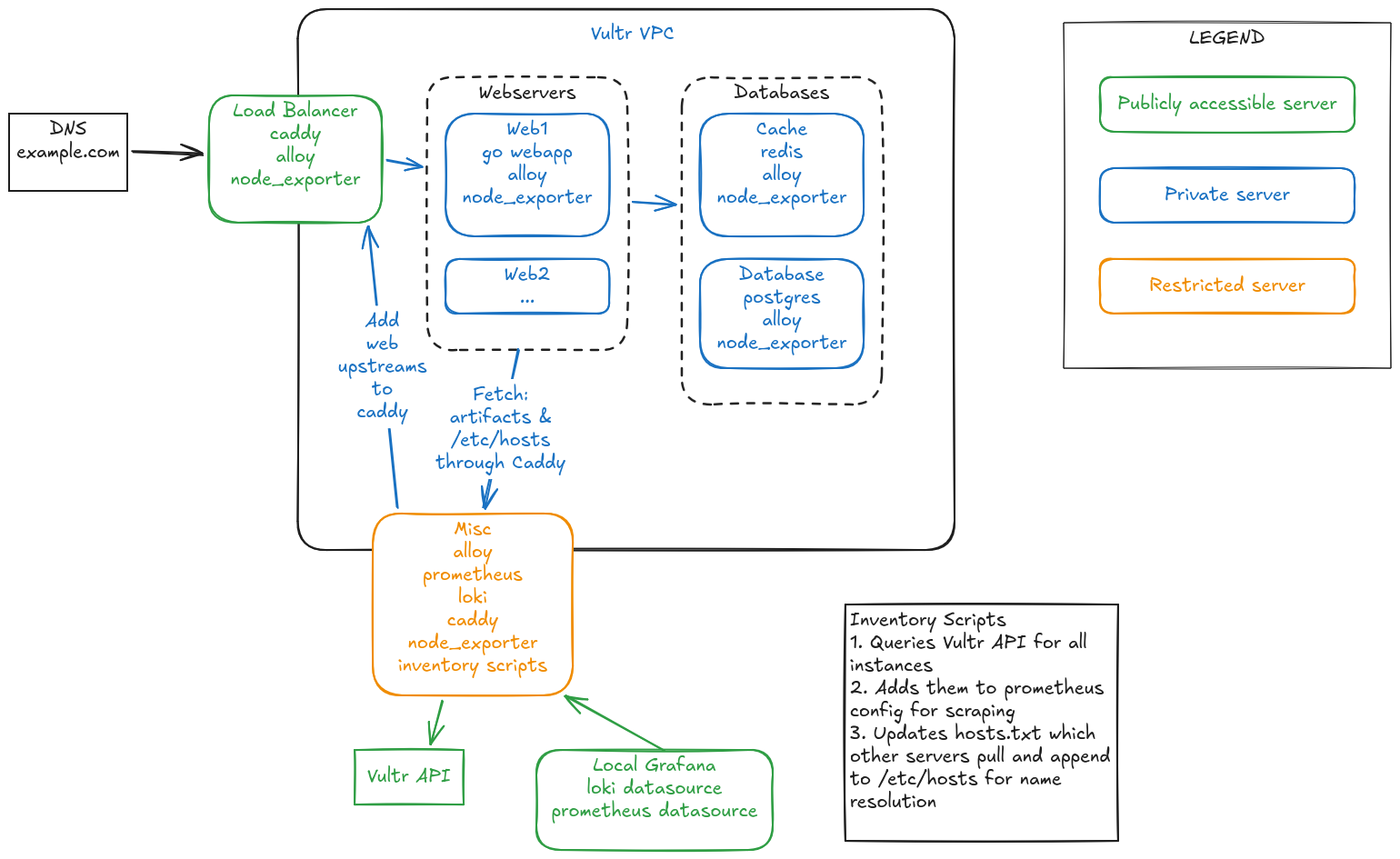
My setup currently looks something like this:
Guiding principles
I’m not striving for perfection, but have drawn some lines in the sand.
- Use Infrastructure-as-Code as much as possible. Some manual configuration is ok for now.
- Kubernetes is often overkill, and costly, for apps just starting out
- Prefer virtual machines over managed services. Mainly due to cost, but also to prevent lock-in.
- Separate the concerns! So we can measure and scale/adjust in targeted fashion. In other words: when possible, each virtual machine should have 1 job to do
- Strive for immutable “phoenix servers”. Not always practical, but it’s a starting point.
My starting place
I’ve chosen the Vultr cloud to start with, because they offer $3.50 per month virtual machines. But there’s a catch … they’re only available in their New York region. And it looks like you can only launch 5 of them. Oh well, moving on.
What I’m learning
In general, if your cloud platform works with Terraform and has Virtual Private Clouds, Firewall Rules, low-cost Virtual Machines, reserved IPs, and free managed DNS, you can go very far!
I’d heard the term cloud-init before, but it also supports an Ansible-adjacent declarative syntax for configuring servers. I opted for a userdata shell script because I need more control, but something to consider. Escaping things in shell scripts is a PITA.
Caddy is my HTTP server of choice, but I’d never used it’s API functionality until now. I created a scheduled job that makes an API call to update Caddy’s list of upstream servers (think AWS Target Groups) with all currently running webservers. Very handy!
For nearly a decade I’ve been using InfluxDB as my metrics database. For this project, I decided to use and learn Prometheus. So far it’s been great. I use node_exporter on my virtual machines, and will soon be adding the Redis Exporter, as well as instrumenting my Go webapp with a /metrics endpoint for scraping.
For centralized log storage I decided to use Grafana Loki. I started using it in my homelab this year, and wanted to gain more experience. I’m using it’s log scraping counterpart, Alloy, as well. I’ve written a custom Alloy config to work with Alpine Linux, with regular expression processing to create additional labels for log messages.
Gotchas
Don’t relaunch your caddy load balancing server too many times. You’ll run up against Let’s Encrypt rate limits and will have to wait 168 hours. Oops, sorry!
Try to keep server IP addresses out of your userdata server configuration scripts. Otherwise, a change that requires a re-launch of one server may trigger a re-launch of your whole fleet. This is why “separation of concerns” is important. Use DNS if your provider offers a private DNS solution, or roll your own workaround (like I did). You don’t want your server’s private IP addresses to show in your public DNS records.
Next Steps
I plan to publish the IaC, scripts, and helper tools I’m using, but need to do some cleanup first. There are many moving parts I’d like to write more about.
After that I’ll likely start on an autoscaling daemon. It’ll query Prometheus for webserver CPU metrics (to start with) and scale webservers out/in as appropriate. It’s fun to re-invent the wheel sometimes because it helps you appreciate the engineering effort behind something that looks simple on the surface.
Onward!